
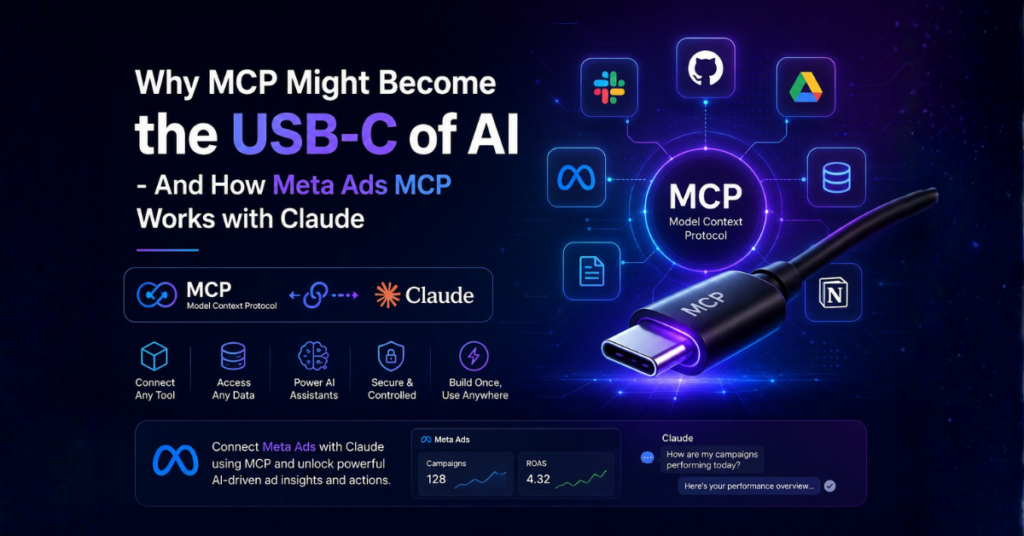


For a while, most AI tools worked like separate islands.
You could use one AI assistant for writing, another for coding, and another for searching documents or answering questions. But the moment you wanted these systems to interact with real tools like Slack, GitHub, Google Drive, databases, internal apps & things became complicated very quickly.
Every integration needed its own setup.
Every platform worked differently.
And developers ended up spending more time connecting tools than actually building useful AI experiences.
That’s where MCP comes in.
MCP, short for Model Context Protocol, is an open standard introduced by Anthropic that aims to simplify how AI systems connect with external tools, applications, and data sources.
A simple way to think about it:
Before USB-C, every device needed a different cable.
Before MCP, every AI tool needed a different integration.
MCP is trying to reduce that mess by creating a common way for AI models to access tools and context.
And while it sounds like a small infrastructure change, it could end up shaping how future AI assistants actually work.
What Is MCP?
A simpler way for AI systems to connect with tools, apps, and external data.
A simpler way for AI systems to connect with tools, apps, and external data.
MCP stands for Model Context Protocol.
It is a standardized way for AI applications to communicate with external systems such as:
- ◾ File systems
- ◾ APIs
- ◾ Databases
- ◾ Developer tools
- ◾ Productivity apps
- ◾ Company knowledge bases
Instead of building separate integrations for every AI model and every tool, developers can build once using MCP and reuse that connection across multiple AI systems.
In simple terms, MCP acts like a bridge between AI models and the tools they need to interact with.
That means an AI assistant can move beyond answering prompts and actually interact with systems in a more structured way.
Why AI Tools Needed Something Like MCP
As AI tools became more capable, connecting them to real-world systems became harder to manage.
Most AI assistants are useful only when they have access to context.
For example:
- ◾ A coding assistant needs access to repositories
- ◾ A workplace assistant needs access to Slack or documents
- ◾ A customer support AI needs access to ticket systems
- ◾ A research assistant may need access to files, spreadsheets, or APIs
Until recently, connecting these systems was inconsistent and difficult.
Developers often had to:
- ◾ Build custom integrations from scratch
- ◾ Maintain separate APIs for different platforms
- ◾ Handle authentication differently for every service
- ◾ Rewrite the same logic repeatedly
This becomes harder as AI agents become more capable.
Instead of just answering prompts, newer AI systems are expected to:
- ◾ Search documents
- ◾ Edit files
- ◾ Trigger workflows
- ◾ Read live data
- ◾ Work across multiple applications
Without a shared standard, scaling these systems becomes messy very quickly.
How MCP Works
MCP creates a shared structure that helps AI models communicate with external tools more consistently.
MCP works using a relatively simple structure.
MCP Server
The server provides tools or information.
Examples include:
- ◾ GitHub repositories
- ◾ Slack workspaces
- ◾ Local files
- ◾ Databases
- ◾ Google Drive
- ◾ Internal business tools
MCP Client
The client is the AI application using those tools.
This could be:
- ◾ Claude Desktop
- ◾ Coding assistants
- ◾ AI agents
- ◾ Enterprise AI systems
Basic Flow
The process usually looks like this:
- ◾ A user gives an instruction
- ◾ The AI checks available tools
- ◾ MCP provides access to relevant systems
- ◾ The AI retrieves information or performs actions
- ◾ The result is returned to the user
The important part is that the AI does not need a completely custom integration every time.
That is one of the main reasons developers are paying attention to it.
Connecting Meta MCP with Claude
One of the more interesting uses of MCP is connecting external platforms and tools directly with AI assistants like Claude.
As MCP adoption grows, more developers are experimenting with connecting Meta-related workflows and services through MCP-compatible setups.
The goal is fairly simple:
- ◾ Give Claude access to structured tools and external context
- ◾ Allow smoother interaction between AI assistants and connected services
- ◾ Reduce the need for manually switching between apps and workflows
While setups can vary depending on the tools being used, the general connection process usually follows a similar structure.
Steps to Connect Meta MCP with Claude
Setting up Meta Ads MCP with Claude is fairly straightforward and usually takes only a few minutes.
Step 1: Open Claude Settings
Start by logging into Claude.
Then:
- ◾ Open your profile or settings section
- ◾ Navigate to Settings
- ◾ Go to Connectors
Most setup walkthroughs begin from the Connectors section inside Claude Desktop.
Step 2: Add a Custom Connector
Inside the Connectors section:
- ◾ Click “Add Custom Connector”
Do not select:
- ◾ “Browse Connectors”
This matters because Meta Ads MCP currently works through a custom MCP endpoint configuration process rather than the default connector marketplace flow.
Step 3: Name the Connector
Next, choose a name for the connector.
You can use any label you prefer, such as:
- ◾ Meta Ads MCP
- ◾ Meta Ads Connector
- ◾ Facebook Ads MCP
The connector name is only for identification and does not affect functionality.
In most examples, the connector is simply named “Meta Ads MCP.”
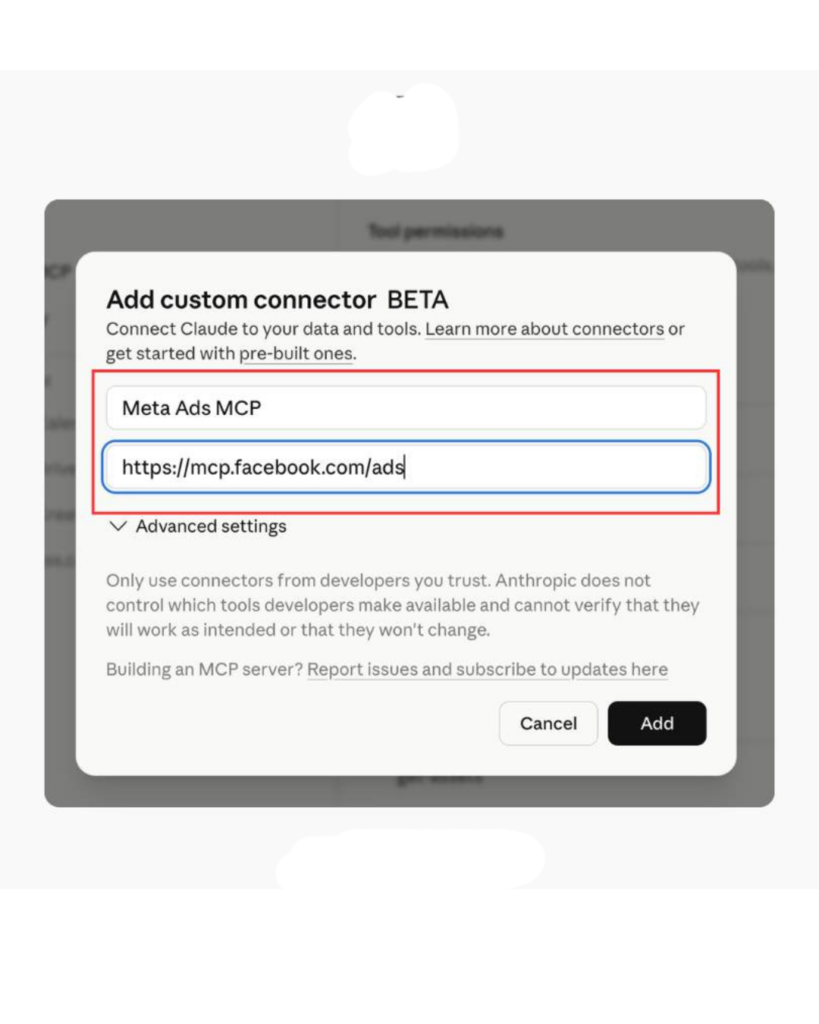
Step 4: Paste the MCP Server URL
Now paste the MCP server URL into the Remote MCP Server URL field.
Example:
Depending on the setup you are using, the MCP provider may supply a different endpoint URL.
Right now, the MCP ecosystem includes several types of providers, including:
- ◾ Meta’s official MCP setup
- ◾ Third-party hosted connectors
- ◾ Agency-focused MCP tools
- ◾ Analytics and reporting integrations
Some commonly referenced providers include:
- ◾ Porter Metrics
- ◾ Ryze AI
- ◾ Pipeboard
- ◾ Composio
- ◾ Canva integrations
Each provider may offer slightly different workflows, permissions, or supported features.
For the setup process, use the MCP endpoint associated with your provider or the one shown in your implementation guide.
Once the MCP server URL is pasted:
- ◾ Click “Add”
Claude will now register the connector automatically.
After setup is completed, the connector should appear inside your Connectors list and become available for MCP-based workflows.
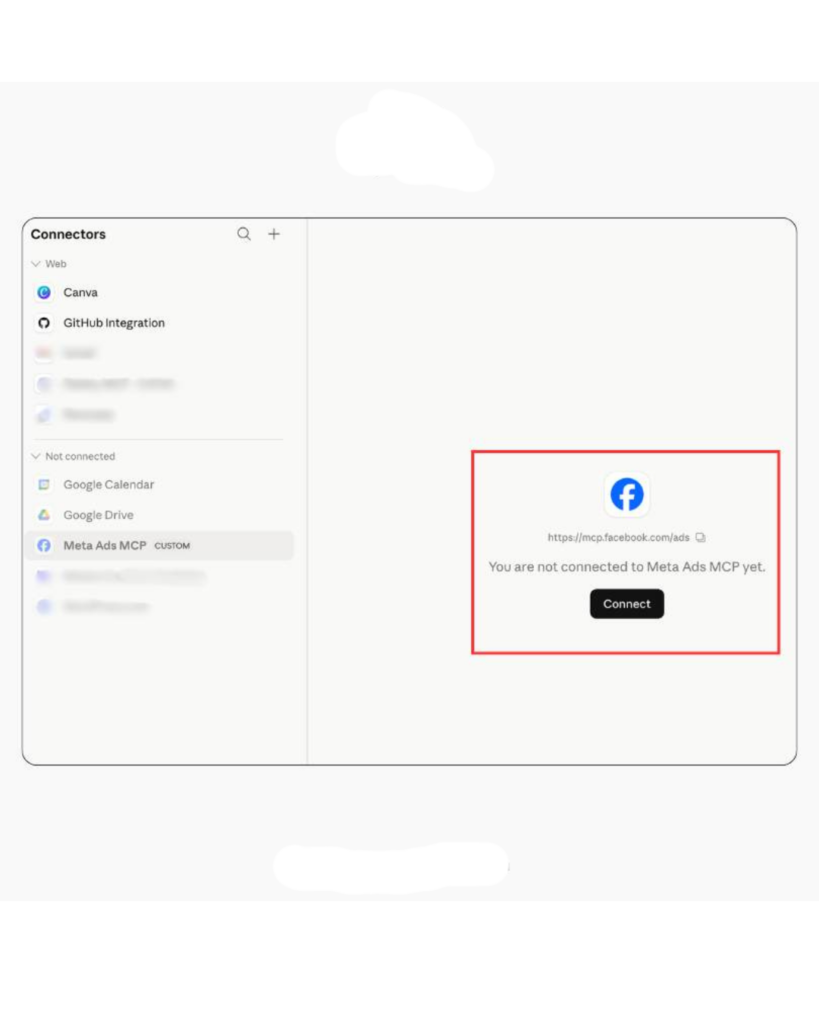
Step 6: Authenticate with Meta
After adding the connector:
- ◾ Click “Connect”
Claude will now redirect you to Meta’s authentication flow.
This process works similarly to connecting Meta with platforms such as:
- ◾ Shopify
- ◾ HubSpot
- ◾ Zapier
Most MCP setups use Meta Business OAuth authentication, so you typically do not need to manually create a developer app.
Once authenticated, Claude can securely communicate with your Meta Ads account through the MCP connector.
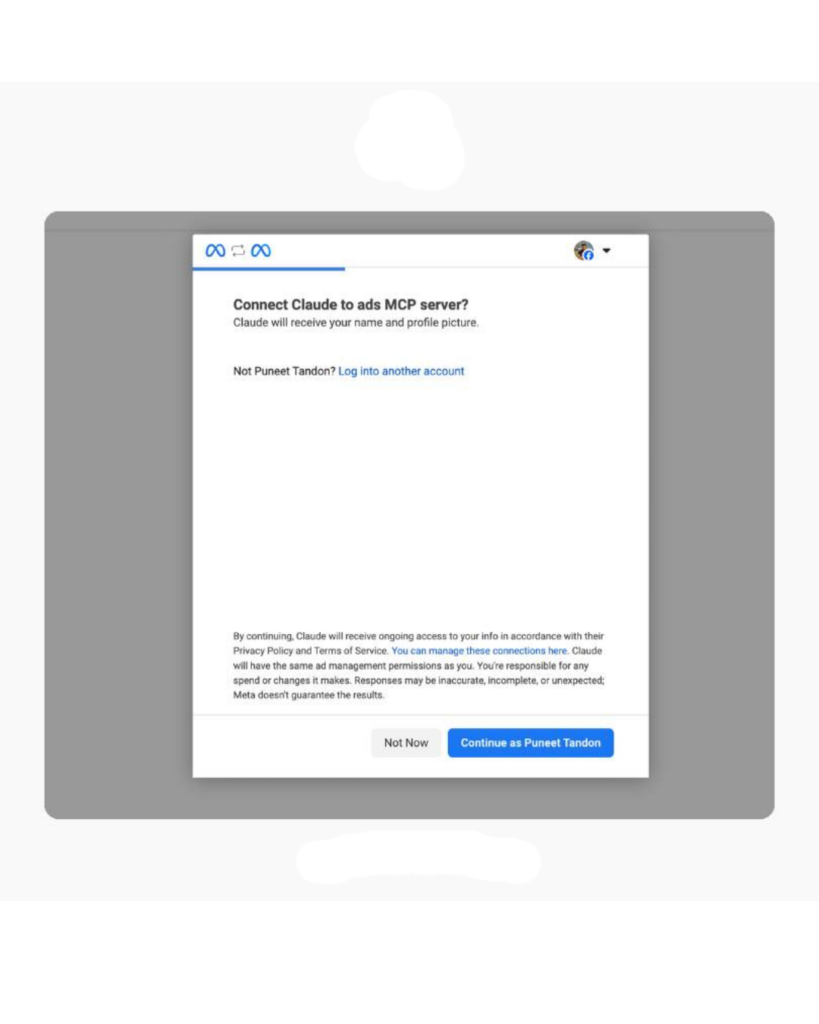
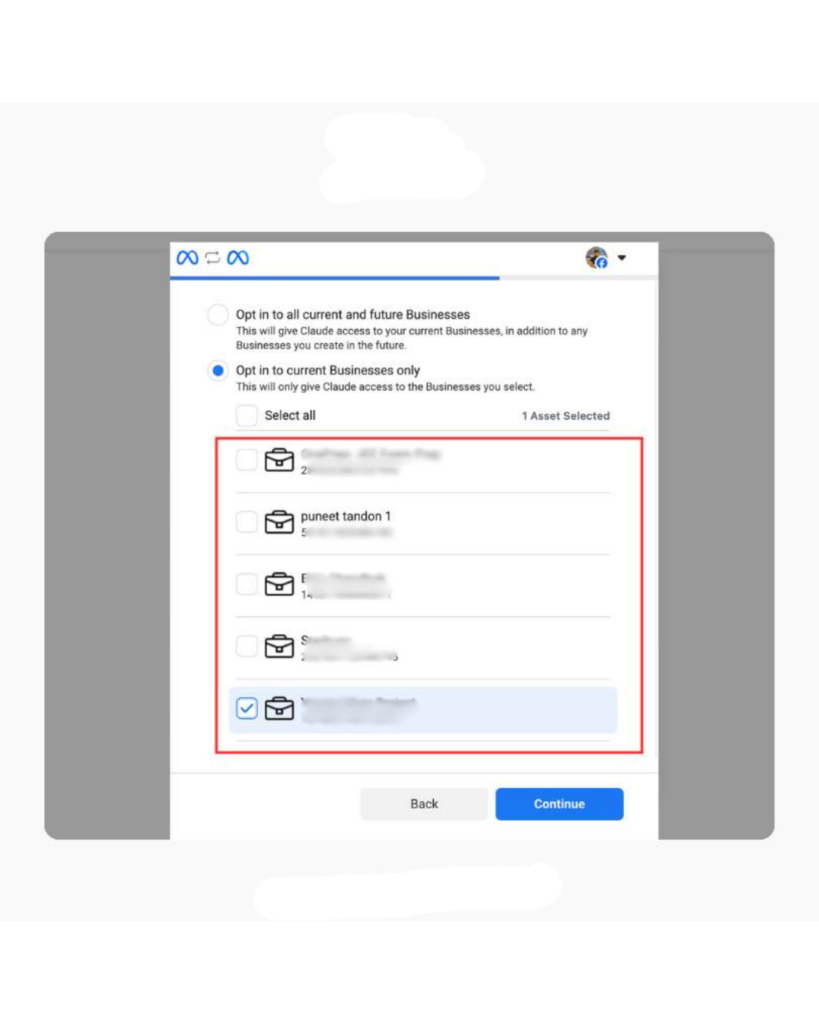
Step 7: Select Your Ad Accounts
Meta will now ask which ad accounts Claude should be allowed to access.
You can either:
- ◾ Select all available accounts
- ◾ Choose only specific accounts
If you work in an agency or manage multiple clients, it is usually better to grant access only to the accounts you actually need.
This helps keep permissions cleaner and reduces unnecessary account exposure.
Step 8: Save Permissions
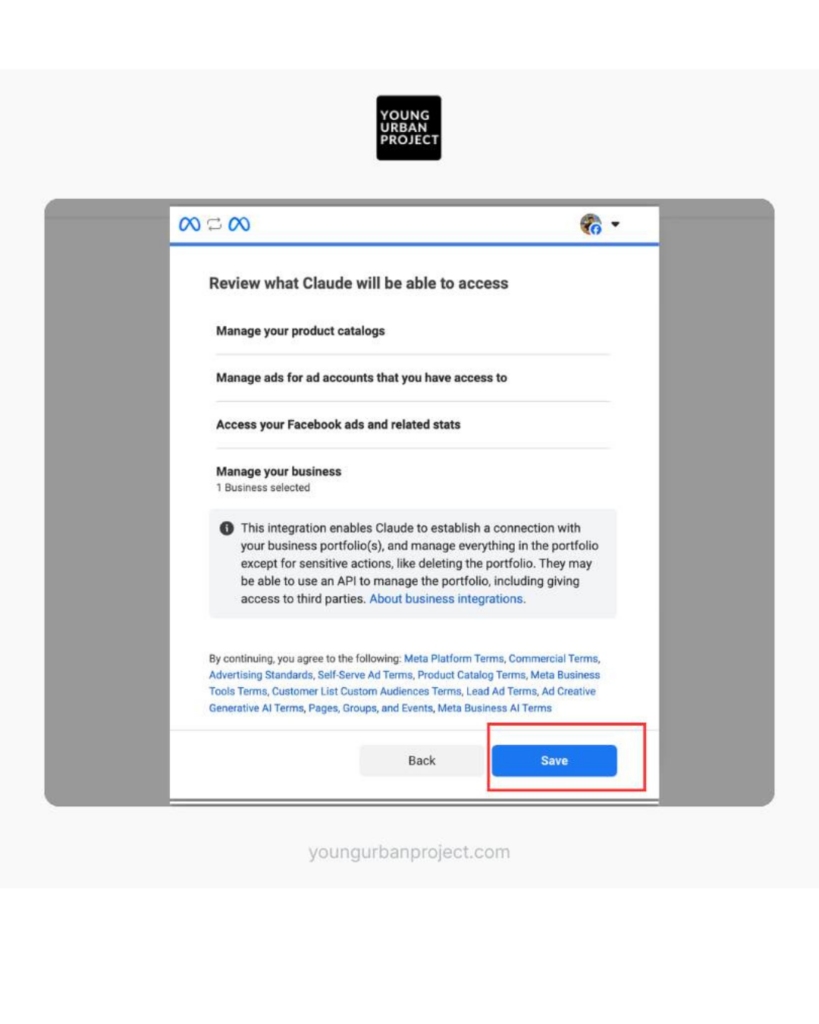
After selecting the accounts:
- ◾ Click “Save”
Claude and Meta Ads are now connected through MCP.
At this stage, Claude can begin interacting with your ad account using the permissions you approve.
Step 9: Configure Connector Permissions
This is one of the most important parts of the setup.
Inside Claude:
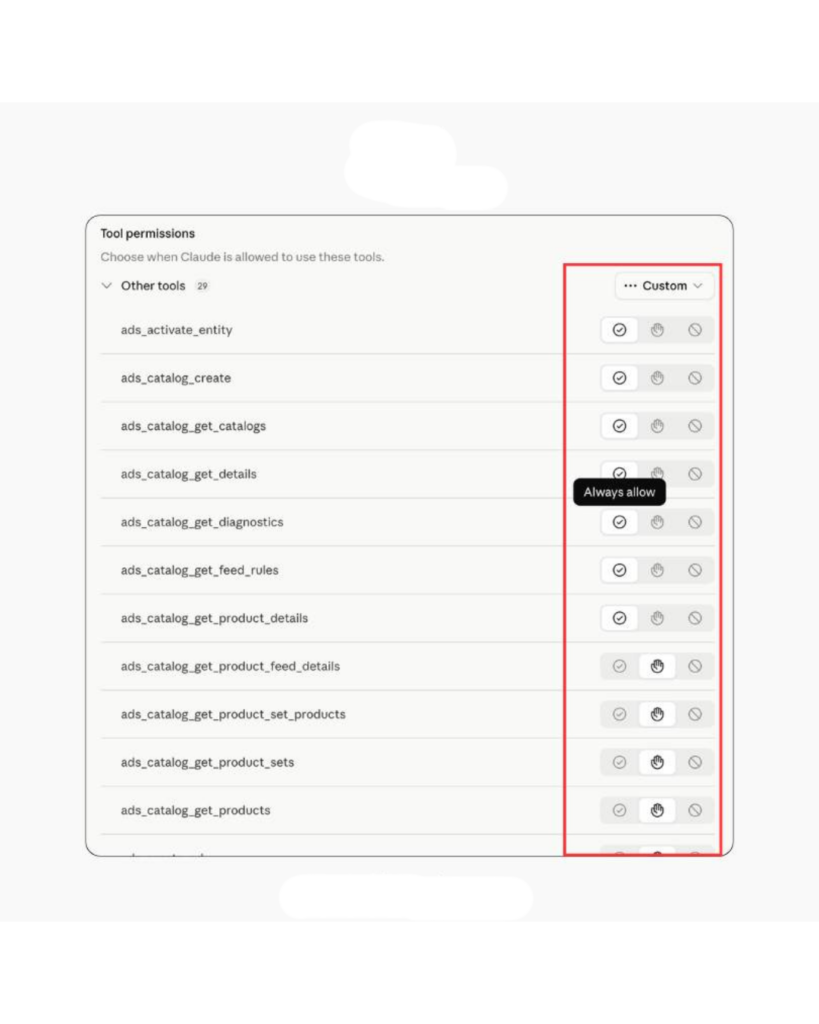
- ◾ Open “Configure Connector”
You’ll now see the list of actions Claude is allowed to perform.
Depending on the connector, permissions may include:
- ◾ Reading campaign data
- ◾ Pulling reports
- ◾ Editing budgets
- ◾ Creating campaigns
- ◾ Pausing ads
- ◾ Accessing analytics
You can configure how Claude handles each action by selecting:
- ◾ Always Allow – Claude can perform actions automatically
- ◾ Ask Permission – Claude asks before making changes
- ◾ Block – Prevent Claude from performing that action
For most users, “Ask Permission” is usually the safer option while testing workflows for the first time.
Why This Matters
The interesting part about MCP is not just the protocol itself.
It is the direction the industry is moving toward.
AI assistants are slowly becoming systems that can interact with software, tools, and workflows instead of only responding to prompts.
Connecting platforms like Claude with MCP-compatible systems is one example of how that transition is already starting to happen.
Why Developers Are Paying Attention
Developers are interested in MCP because it reduces repeated integration work.
A large reason MCP is gaining traction is because it solves a practical problem.
Developers want AI systems that can work with real tools without spending weeks building infrastructure around them.
Some of the biggest advantages include:
- ◾ One shared integration approach
- ◾ Easier tool connectivity
- ◾ Reusable infrastructure
- ◾ Better context handling
- ◾ Faster development cycles
- ◾ Less maintenance work
It also helps reduce fragmentation.
Instead of every AI company creating completely separate ecosystems, MCP creates a more compatible approach that multiple tools can use.
That interoperability is a major reason people compare it to USB-C.
Why the “USB-C of AI” Comparison Fits
The comparison comes from MCP’s goal of creating a common standard across different AI systems.
The comparison works because USB-C solved a very similar problem in hardware.
Before USB-C:
- ◾ Different devices used different cables
- ◾ Accessories were inconsistent
- ◾ Compatibility was frustrating
USB-C simplified that ecosystem by introducing a common standard.
MCP is attempting something similar for AI systems.
Instead of:
- ◾ Separate integrations
- ◾ Isolated toolchains
- ◾ Platform-specific connectors
MCP creates a shared communication layer.
That does not mean every AI tool becomes identical. But it does mean developers can spend less time rebuilding the same integrations repeatedly.
The Bigger Shift Happening Around AI Agents
AI tools are slowly moving beyond chat and toward handling actual tasks and workflows.
The rise of MCP also reflects a larger shift in how AI products are evolving.
Earlier AI tools mostly focused on conversation.
Now the focus is moving toward systems that can actually perform tasks.
That includes:
- ◾ Managing files
- ◾ Reading documentation
- ◾ Updating repositories
- ◾ Working across apps
- ◾ Executing workflows
- ◾ Handling multi-step actions
For these systems to work reliably, they need structured access to tools and context.
That is exactly the kind of problem MCP is trying to solve.
Security Concerns Still Exist
Giving AI systems broader access to tools also introduces new security risks.
Like any system that connects AI models to external tools, MCP also introduces risks.
Some concerns include:
- ◾ Malicious tool access
- ◾ Prompt injection attacks
- ◾ Unsafe third-party MCP servers
- ◾ Excessive permissions
- ◾ Data exposure risks
As adoption grows, security will likely become one of the biggest areas of focus.
Especially in enterprise environments where AI systems may interact with sensitive internal information.
Why MCP Matters Going Forward
MCP may end up becoming an important layer in how future AI systems interact with software and data.
It is still early, and MCP is not guaranteed to become the universal standard for AI integrations.
But the reason people are paying attention is simple:
AI tools are becoming more useful when they can interact with real systems instead of staying limited to chat windows.
The companies building the next generation of AI assistants will need ways to connect models with tools, applications, and live context efficiently.
MCP offers a cleaner way to do that.
And if adoption continues growing across the industry, it may eventually become one of the core pieces of infrastructure behind modern AI systems – even if most users never notice it directly.