


Here’s something a lot of SEOs and content teams don’t think about…
LLMs don’t browse your website the way humans do.
They don’t “see” animations, fancy JS widgets, or client-side rendered sections unless a rendering layer is involved. Some systems (like search engines or AI assistants) may use headless browsers – but not always, and not fully.
So if your key content only loads via JavaScript… there’s a chance it’s invisible to them.
Let’s fix that 👇
Quick Test: View Your Site Like an LLM
You can simulate what an LLM can access in under 2 minutes using Chrome DevTools.
Steps:
- 1. Open the webpage you want to test
- 2. Press F12 → opens DevTools
- 3. Go to the Elements tab
- 4. Press CTRL + SHIFT + P
- 5. Type “JavaScript”
- 6. Click Disable JavaScript
- 7. Refresh the page
Now you’re looking at your site without JS rendering – basically raw HTML output.
Extract the Text Content
Now let’s pull the actual readable text:
Now let’s pull the actual readable text:
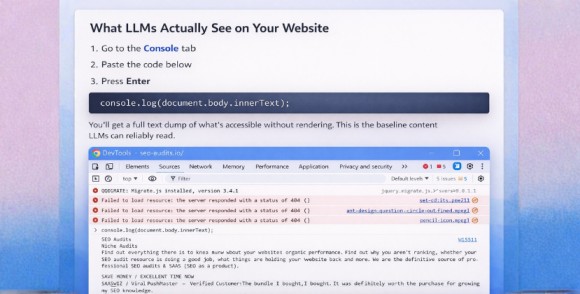
- 1. Go to the Console tab
- 2. Paste this:
console.log(document.body.innerText);
- 3. Press Enter
You’ll get a full text dump of what’s accessible without rendering.
This is the baseline content LLMs can reliably read.
Advanced Comparison (Highly Recommended)
If you want deeper insight:
Step 1 — Save the no-JS output
- • Copy the console text
- • Paste into a .txt file
Step 2 — Repeat with JavaScript enabled
- • Re-enable JS
- • Refresh page
- • Run the same console command
- • Save this output too
Step 3 — Compare using an LLM
Drop both files into ChatGPT / Claude / Gemini and ask:
“Compare these and highlight missing content.”
This instantly shows what content depends on JS rendering.
Why This Matters for SEO + AI Visibility
Here’s what you’ll often discover is missing:
- • Tabbed content
- • Accordion FAQs
- • Reviews widgets
- • Pricing tables
- • Lazy-loaded text
- • JS-injected internal links
SPA framework content (React/Vue)
If it’s not in raw HTML, it’s less reliable for:
- • LLM training data
- • AI answer citations
- • Search indexing (in some cases)
- • Retrieval systems
Quick Fix Ideas
If important content disappears without JS:
- • Server-side render key sections
- • Add HTML fallbacks
- • Use prerendering
- • Ensure internal links exist in raw DOM
Don’t hide critical copy in tabs
Think of it this way:
If JS fails, your content strategy shouldn’t fail with it.
Final Thought
We’re entering an era where visibility isn’t just about Googlebot…
It’s about AI retrieval, summarization, and citation.
Running this quick DevTools test helps you see your site from that lens – and catch blind spots before they cost you traffic, mentions, or authority.
Need help with your SEO or digital growth?
Reach out to our team at “[email protected]” and let’s get started.