
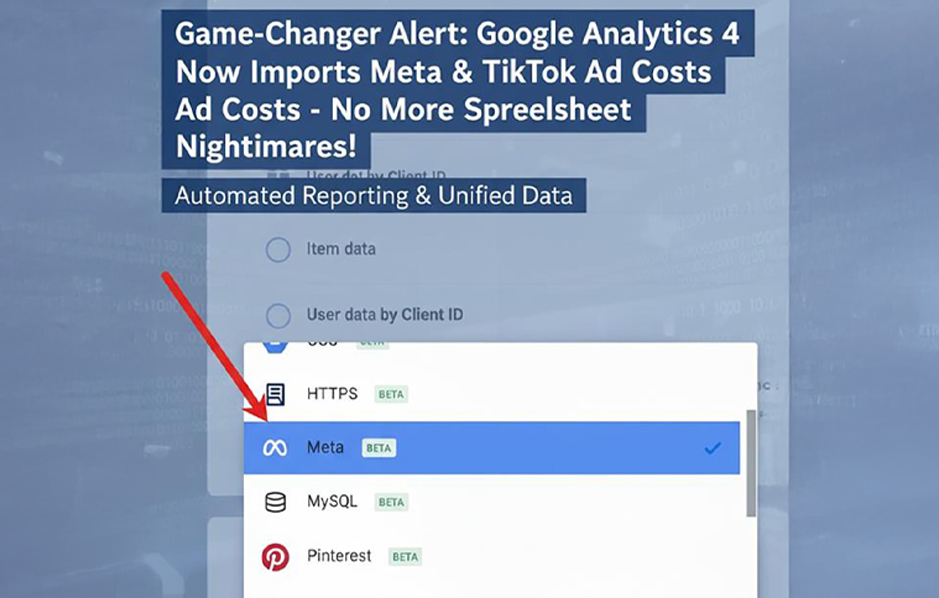


Yo, performance marketers and media buyers, brace yourselves – Google just dropped a massive update that’s got us all buzzing. After years of juggling clunky spreadsheets to track ad spend across platforms, Google Analytics 4 (GA4) now natively imports cost data from Meta (Facebook + Instagram) and TikTok Ads. Announced on October 7, 2025, this isn’t just a tweak; it’s a total game-changer. Let’s dive into why this matters, how to set it up, and what it means for your campaigns – with a mix of laid-back vibes and straight-up facts.
Why This Feels Like Winning the Data Lottery
If you’ve ever run paid campaigns, you know the pain. GA4 handles your Google Ads data like a champ, but Meta and TikTok? That meant exporting CSVs from Ads Manager, praying your UTMs aligned, and manually uploading to GA4 while dodging duplicates. It was like assembling a puzzle with half the pieces missing. This new integration puts that chaos to bed. GA4 now pulls cost, clicks, impressions, and more straight from Meta and TikTok – up to 24 months of historical data, no manual uploads needed. Imagine seeing your Paid Search and Paid Social performance in one clean dashboard, with true ROI and ROAS calculated automatically. No more Excel meltdowns!
What’s Actually Coming Into GA4?
Here’s the juicy part – what you get with this integration:
- ➔ Ad Spend (Cost): Your exact budget burn.
- ➔ Clicks: Who’s clicking through to your site.
- ➔ Impressions: How many eyeballs you’re snagging.
- ➔ Bonus Metrics: Think CPC, CTR, and blended ROAS across channels.
This means you can finally compare Meta’s video ads, TikTok’s viral bangers, and Google’s search campaigns side by side in GA4’s Acquisition or Advertising reports. Spot a channel tanking your ROAS? Tweak budgets on the fly. Need to justify spend to the C-suite? Your data’s all in one place, no stitching required. It’s the single source of truth we’ve been begging for.
How to Set It Up: Quick & Painless
Ready to get started? You can have this rolling in under 10 minutes, but test in a sandbox property first to keep things tidy. Here’s the step-by-step for both platforms:
For Meta Ads (Facebook + Instagram):
- What You Need:
- ➜ Access to a Meta Business Account, Ad Account, and Editor or Administrator role in your GA4 property.
- ➜ Go to Admin → Data Collection and Modification → Data Import
- ➜ Click “Create Data Source” → Choose “Cost Data” → Select “Meta (Facebook & Instagram)”
- ➜ Sign into your Meta account and choose your Business Center and Ad Account.
- ➜ Map UTMs carefully – your UTM source and medium must match exactly.
- Example:
utm_source=meta,utm_medium=paid - (Updated Tip: Include
utm_idif used in your ad tracking — GA4 now matches cost data via utm_id where available.)
- Example:
- ➜ Click Connect, authorize, and GA4 will backfill up to 24 months of data.
For TikTok Ads:
What You Need:
Analyst or Admin role in TikTok Ads Manager and Editor role in GA4.
- ➜ Go to Admin → Data Collection and Modification → Data Import
- ➜ Click Create Data Source → Cost Data → Select “TikTok Ads.”
- (Note: The TikTok connector is still rolling out globally — if you don’t see it yet, it’s coming soon.)
- ➜ Sign into TikTok Ads, select your Ad Account.
- ➜ Map your UTMs (e.g.,
utm_source=tiktok,utm_medium=paid, andutm_idif used). - ➜ Click Authorize and Connect. GA4 will begin importing and backfilling up to 24 months of data.
Processing Time: Expect data to appear within 24 hours — though some reports may start showing earlier.
(Updated: Removed “30 minutes” — GA4 officially notes up to 24 hours for processing.)
Quick heads-up: Data processing takes about 30 minutes, but it might need 24 hours to fully show up in reports. Got old manual imports? Delete them first to avoid duplicate data – GA4 won’t clean that up for you. Also, you’re limited to one connection per platform per property, so choose your accounts wisely.
Why This Rocks for Your Strategy
This update isn’t just about saving time (though it’ll save you buckets). It’s about smarter moves and cleaner insights:
- ➜ Unified Dashboards: See Google, Meta, and TikTok metrics together in GA4’s reports. CPA, ROAS, channel breakdowns – all at your fingertips.
- ➜ Faster Decisions: Spot underperforming campaigns instantly and shift budgets without guesswork.
- ➜ Historical Goldmine: That 24-month data pull lets you analyze seasonal trends or long-term performance like a pro.
It’s like upgrading from a flip phone to a smartphone less hassle, more power. Your marketing, finance, and exec teams will love the clarity.
Watch Out for These Gotchas
Nothing’s perfect, so here are a few things to keep in mind:
- ➜ One Source Limit: Only one automated import per platform per GA4 property.
- ➜ Attribution Quirks: Meta and TikTok’s attribution models don’t always vibe with GA4’s data-driven one, so ROAS might look slightly off.
- ➜ Beta Phase: This is still rolling out globally, so test carefully.
- ➜ Manual Cleanup: GA4 won’t de-dupe old imports, so clear them out yourself.
The Bottom Line: Hello, Transparent Marketing!
We’ve all lost sleep over fragmented data, mismatched numbers, and endless tabs. This GA4 update changes the game by making Meta and TikTok cost imports seamless. It’s better data, cleaner reports, and smarter strategies – all in one place. So, dive in, set it up, and watch your campaigns level up with help from Mindbees. Got a horror story from the spreadsheet days or already loving this update? Drop a comment – let’s swap stories. And if you’re all about scaling paid social, stick with us for more tips on marketing analytics.